Docs / Onboarding
Connecting your Cloudflare account
How the one-broad-token → narrow-working-token bootstrap works and what permissions we need.
Heads up: Cloudflare Pages is the only deploy target open to self-serve today — it's the fastest path to a live URL and free for our typical site sizes. Netlify and your-own-server targets are in final testing and open to all tenants over the next few weeks. This guide covers the Cloudflare path.
Why we need a Cloudflare account
Site Generator doesn't host your sites. Every deploy lands on a Pages project under your Cloudflare account — that's the static-export contract. You own the infrastructure, we own the build pipeline.
To deploy on your behalf, we need a Cloudflare API token scoped to Pages:Edit on a specific account. You won't create that one yourself — you create a short-lived bootstrap token that lets us mint the working token automatically, then delete the bootstrap immediately.
The bootstrap flow
- In the cabinet's Integrations tab, click Connect Cloudflare. The drawer shows step-by-step instructions and an entry form.
- In your Cloudflare dashboard, open Manage account → Account API tokens → Create a token. Use the Account-plane page (left rail), not the user-level Profile → API Tokens.
- Give it any name (e.g.
bootstrap generator) and add two Permission policies:Account → Account Settings → ReadAccount → Account API Tokens → Write
- Token expiration: 7 days (or a Custom short window). We delete the token immediately after using it; the expiration is a safety net.
- Review token → Create Token Secret → copy the value.
- Paste the value plus your Account ID into the cabinet drawer and click Connect. We use it once to mint a narrow
Pages:Editworking token, store the working token encrypted, and delete the bootstrap token from your account via the same API.
The Create a token form when you reach step 3:
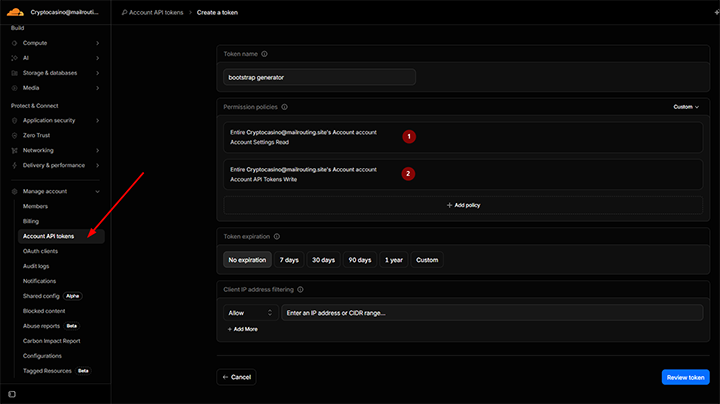 Sidebar: Manage account → Account API tokens. Right pane: name + two permission policies + expiration.
What gets stored
- Narrow API token — encrypted at rest, used for Pages deploy + Zone Rules provisioning (when you attach a domain).
- Account reference — your CF account ID, so we know which account to deploy to.
- Pages project name — auto-created on first deploy (
generator-<siteId>) or pre-existing if you nominate one.
We don't store the broader token, your CF dashboard credentials, or any other Cloudflare data.
Disconnecting
From the cabinet, click Disconnect Cloudflare. We delete the narrow token immediately. Deployed bundles stay live on your CF account until you remove them from the Pages dashboard there — Site Generator only controls the build pipeline, not the running infrastructure.
What if I want to use my own CF Pages project name?
Pre-create the project in the CF dashboard, then enter its name in the cabinet'sDeploy config. We'll use it as-is instead of auto-creating one.
Does the narrow token expire?
Not unless you set an expiry when creating it (we don't). Rotate it from the cabinet if you're concerned about long-lived credentials.
I already have a CF Pages project for this site — can I just point at it?
Yes. The bootstrap detects existing projects when you nominate the name. Subsequent deploys go to the same project.